
MathJax, the web library that provides LaTeX-quality mathematical typesetting, has received a a new set of tools to improve accessibility of mathematical notation. The new MathJax Accessibility Extensions add on-the-fly speech rendering of notation, and a tool to explore expressions through intelligent collapsing and expanding of sub-expressions.
You're reading: Posts Tagged: MathJax
MathML 3.0 is now an ISO standard
Now, uninteresting international standards news!
It’s easy to forget about MathML, because unless you’re a publisher or doing complicated things with data flows, you never need to see it.
I’m not doing a great job of selling this story, am I? I couldn’t even find a picture to illustrate it.
After a lengthy lull in which MathML was deeply unpopular, mainly due to browser makers not supporting it but mainly due to it being extremely hard for the average mathematician to work with, the format which aimed to be able to represent all maths is having a bit of a resurgence these days. The web is catching up – MathJax uses MathML to represent mathematical notation internally, and that is adding pressure to browser makers to implement support for rendering MathML without any additional library.
The W3C have announced that MathML 3.0 is now an ISO/IEC international standard. That doesn’t have much impact on anything other than giving it a stamp of approval, so you can carry on with your day.
See, I told you this wasn’t interesting.
KaTeX is a (partial) alternative to (some of) MathJax
Khan Academy has released a new library to typeset mathematical notation on webpages, called KaTeX.
Dynamic generation of maths questions
I was recently asked about my MSc dissertation (by someone who may choose to ‘out’ themselves here, but as it was a personal email I won’t name them). In my dissertation, for a Masters degree in computing in 2003-4, I developed a system for pre-processing MathML code using PHP to include pseudo-randomised values in the questions for an e-assessment tool. The title is ‘Asking Questions With MathML: dynamic treatment of XML and pseudo-randomised mathematics assessment’.
The query was from someone who is training to be a maths teacher and is doing some web development. They had seen mention of my MSc dissertation topic on this blog and asked where they could read more about the underlying web technologies. Here, basically, is what I replied.
The arXiv has enabled MathJax!
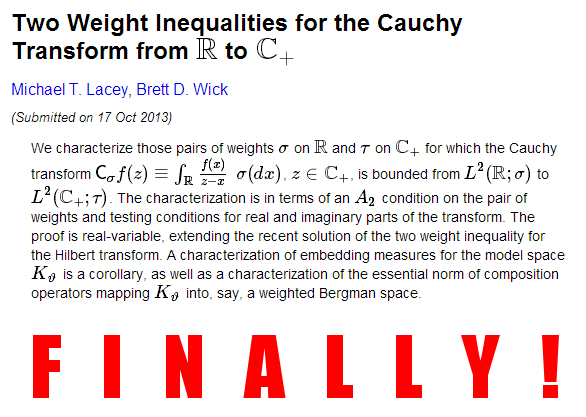
A bit of slightly overdue but welcome news: the arXiv has enabled MathJax on paper abstract pages. Authors have regularly been using LaTeX syntax in their titles and abstracts, but now the arXiv typesets them automatically for you.
Chrome now supports MathML
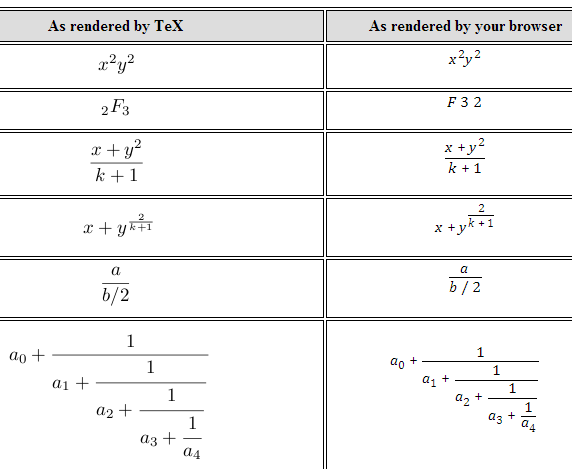
Update 07/02/2013: Google giveth, and it taketh away. MathML support in Chrome has been disabled until it’s “production-ready”.
Putting maths on the web has always been a tricky proposition. Typesetting notation is a highly complicated procedure, so for years people have got by either by compromising on aesthetics and writing equations in plain, unadorned text, or by using off-line LaTeX compilers to make blurry images of what they’re trying to say.
Wikipedia adds MathJax display option
According to a post by Frédéric Wang on the Mozilla MathML mailing list, Wikipedia now supports rendering mathematics via MathJax (and through it, MathML). Wang says:
Today, a new Math rendering mode has been added to Wikipedia. You need a Wikipedia account to use it. In My preferences => Appearance => Math, choose “MathJax”. Once enabled, MathJax’s HTML-CSS output will be used by default. If you want to use MathML instead, right click on a formula and choose “Math Settings => Math Renderer => MathML”.